
 Jordan Hale
You keep a plan with dates on it, and you also keep a private sheet with the dates you actually believe. The second one is the one you use when someone asks. That is not a personality flaw. It is what happens when moving one date by hand means moving nine others, and nobody has twenty minutes for that on a Tuesday.
This is for people who run work with dates attached to it. It is not a fit if nothing you run has a calendar.
In plain English: Goalpen lets you move the one date that slipped, then reschedules the branch behind it — so you can delete the private sheet.
The week the plan stopped being true
Monday of week two, a supplier comes back slowly. One task runs four days longer than planned. Nothing dramatic. Tuesday, everything downstream is now wrong — not blocked, not flagged, just wrong by four days, quietly, in nine places. Wednesday somebody asks you for a date. You give them the one from your own sheet, because you know the plan is stale and you do not have half an hour to fix nine rows. Thursday a second person asks. You give a slightly different answer, because you are estimating again rather than reading. Friday the plan and reality have separated for good. From here the plan is a document you maintain out of duty, and the real schedule lives in your head.
If you already keep that private sheet, keep reading. The next part is the habit — not a tour of menus.
Why nobody updates the dates
Because doing it by hand is punishing. Move one task and you should move everything that follows it, then stretch the parent to cover its children, then check whether the whole thing still lands before the deadline. That is twenty minutes of careful clicking to record a four-day slip — and it has to happen again next week.
So people do the rational thing. They stop maintaining the shared plan and keep a private tracker instead. Which makes the shared plan the least accurate document in the building, and teaches everyone to ignore it.
Move the one date that actually changed
You open the branch and press Reschedule Tasks. You move the supplier's date. The plan does the rest. Tasks that follow a sibling get pushed along behind it. A parent stretches to cover the work underneath it. Anything you have deliberately pinned by hand stays where you put it. You can pause the automatic part while you make several edits and then let it run again. Undo and Redo are there. Reset all changes if you would rather start the pass over.
If the slip is bigger than a few days — the whole delivery needs to land in a quarter instead of six weeks — you can say that to Ask AI on the Team and Business plans, and it stretches the timeline without renaming any of the work. The draft sits beside the tree until you apply it.
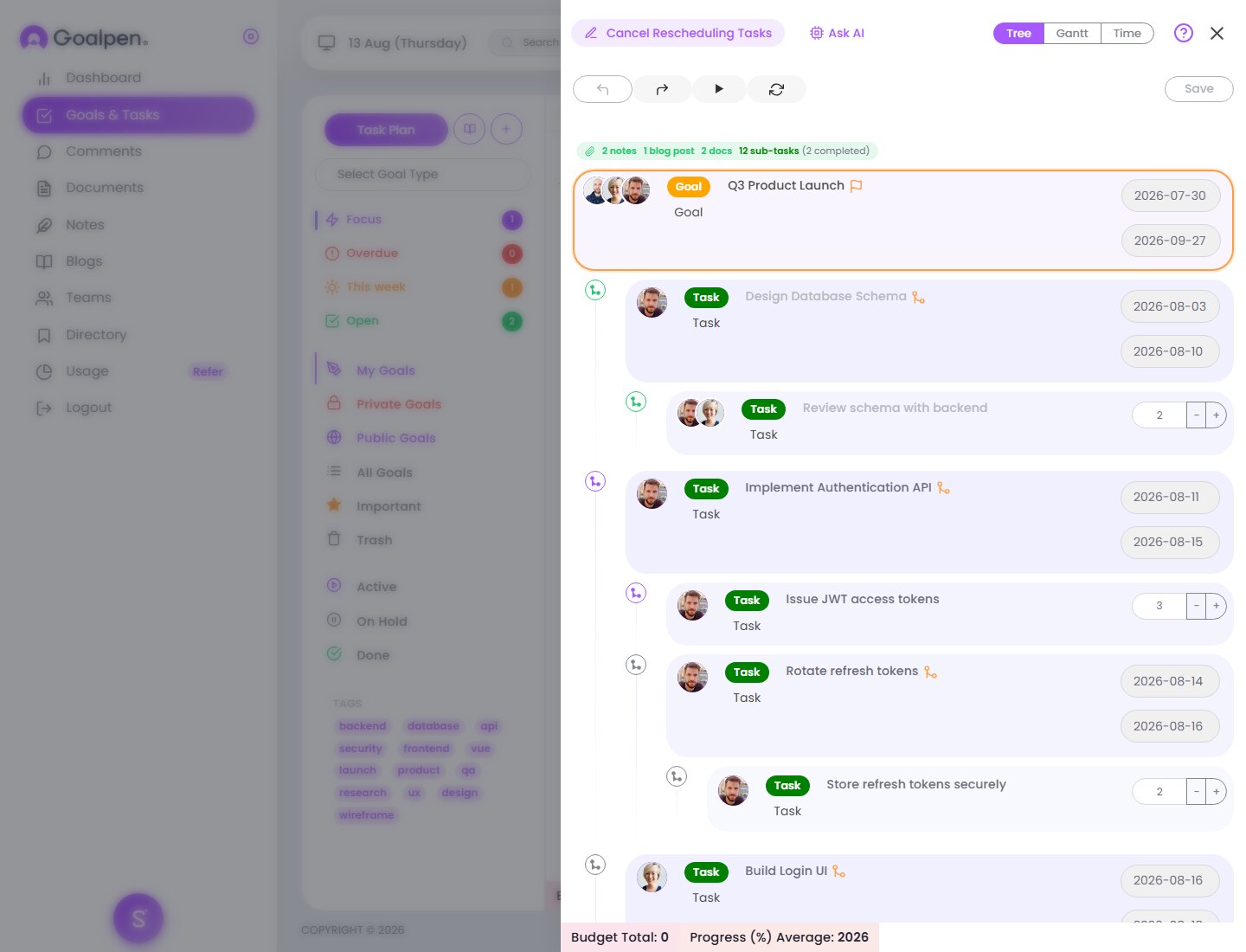
This sequences work under its parent and follows finish-to-start links. It is not a critical-path engine, and the other dependency types are recorded on the task but not enforced by the automatic pass. Rescheduling a branch is restricted to the person who owns it and the people assigned to it.
Take the delivery whose dates you privately distrust
Open it. Press Reschedule Tasks. Move only the task that genuinely slipped. Let the pass run, then compare the result against the sheet in your drawer. If they now agree, delete the sheet.
Prefer to talk it through first? Use Contact us. Want the numbers before anything else? Skim Pricing. No hard sell either way.
*Current page check: “delete the private sheet” (13 August 2026).*